

For people choosing their first VPS, moving a local service online, or replacing a server—and the AI agents helping them do it.
Even with an AI agent doing the work, you can learn to understand what it is about to change and whether that change actually worked.
The guide combines primary documentation, synthetic examples, and operational experience with explicit conditions. Use the references to choose a route that fits your machines, harnesses, and services.
Nine chapters, references for time, access, multi-machine work and daily operations, reusable agent work orders, configuration examples, six architecture diagrams, and a working read-only health tool. The full tutorials are written in Chinese with English technical terms; this English entry point maps the same capabilities. Examples use synthetic identities and documentation addresses.
Reading paths · Architecture atlas · Agent entry · Checks
Open the reading site → with chapters grouped into foundations, migration and recovery, and connections and troubleshooting; plus in-browser search, mobile layouts, inline term definitions and the architecture atlas. It renders the same Markdown sources; the full guide remains in Chinese. See site/README.md for building and maintenance.
Start with your task
| Task | Read | Result |
|---|---|---|
| Understand plans before buying | 01 · VPS basics | A workload, resource, network and budget checklist |
| Set up a new server | 02 · First day | Recovery access, independent login, limited exposure |
| Deal with memory pressure or full disks | 03 · Operations, 08 · Troubleshooting | Layered diagnosis, swap/OOM context and recovery |
| Move a local service to a VPS | 04 · Local → VPS | Candidate deployment, data transfer, ingress and client checks |
| Switch servers or providers | 05 · VPS → VPS | One active writer and a data-aware cutover/recovery plan |
| Reorganize a Claude environment after account problems | 06 · Backup, cleanup and recovery | Two attributed approaches, concrete state locations and selective restoration |
| Understand DNS, Tunnel, VPN and proxies | 07 · Networks and proxies | Separate ingress, administration and application egress |
| Let a VPS worker reach a Mac project | 09 · Private remote access | Tailscale grants, ordinary OpenSSH and non-interactive environment checks |
| Coordinate UTC and local time, or investigate NTP / UDP 123 | Machine time reference | Timestamps, user timezones, hook freshness, scheduling semantics and sustainable synchronization |
| Share a VPS with people or agents without losing access | Access and recovery reference | Distinct credentials, actual execution permissions, fresh connection checks and targeted recovery |
| Coordinate local and remote harnesses or hand over a long task | Multi-machine operations | Locate execution, shared resources, runtime configuration and the original job |
| Diagnose ineffective config changes or a service that only works in a terminal | Configuration and runtime | Trace loaded configuration and distinguish built, installed, running and client-visible versions |
| Recover missed schedules or avoid overlapping and duplicate jobs | Scheduled jobs | Define catch-up and overlap policies, inspect the original job and verify its outputs |
| Understand unreleased disk space or retain logs, caches and backups | Data lifecycle | Reconcile space usage, identify data owners and preserve recoverability before cleanup |
| Inspect resource headroom | Health tool | A Linux resource snapshot and offline HTML report |
| Work with an agent | Agent work orders | Explicit scope, stop conditions, recovery and evidence |
Each chapter starts with a concept map; three additional comparisons explain SSH keys, RAM / swap, and migration rollback boundaries. The 29-term glossary provides short definitions and links back to the relevant section. On the reading site, dotted-underlined terms open in place; pinned notes highlight common confusions. Link markers distinguish internal reading, definitions, this project’s GitHub repository, and external references, with an expandable key below the title.
New readers can start with 01 → 02 → 03 → 07, then choose a migration or private-access path. Account cleanup does not require buying a server.
Local search recognizes common questions such as “SSH 超时”, “磁盘满”, “UDP123”, “时间 hook”, “多 harness”, “配置没生效”, “定时任务漏跑”, and “删了磁盘没变”, with multiple-keyword matching. Each chapter has an expandable environment and verification note, plus a comprehension question with a collapsed answer.
Run a synthetic example
Try the interactive Health simulator first → Switch between five synthetic scenarios: ordinary operation, memory pressure, disk capacity, inode exhaustion and missing readings. Scrub or replay an hour and watch charts, values and status change together. It does not connect to a real machine. A separate fixed synthetic snapshot previews the CLI output.
Python 3.9+ is enough. No pip dependencies. Download the repository or clone it:
git clone https://github.com/IndelibleVivi/infra-field-guide.git
cd infra-field-guide
From the repository root in a POSIX shell:
mkdir -p reports
python3 tools/health.py collect --demo -o reports/health-demo.json
python3 tools/health.py render reports/health-demo.json -o reports/health-demo.html
Open reports/health-demo.html from your file manager. It shows RAM, swap, load, root filesystem bytes/inodes, uptime and memory PSI. This fixed example includes low memory, low disk headroom and unconfigured swap; the offline snapshot has no playback. Repeated runs need new output filenames: the tool protects existing files.
This demo uses a fixed synthetic fixture. It does not SSH, access accounts, install services or make network requests. Real collection supports Linux only; macOS and Windows can run the demo and render JSON. On Windows, create reports manually and use your available Python command. The report is a snapshot, not continuous monitoring or an alerting service. Read the tool contract for thresholds, errors, container limits and data handling.
See the complete system
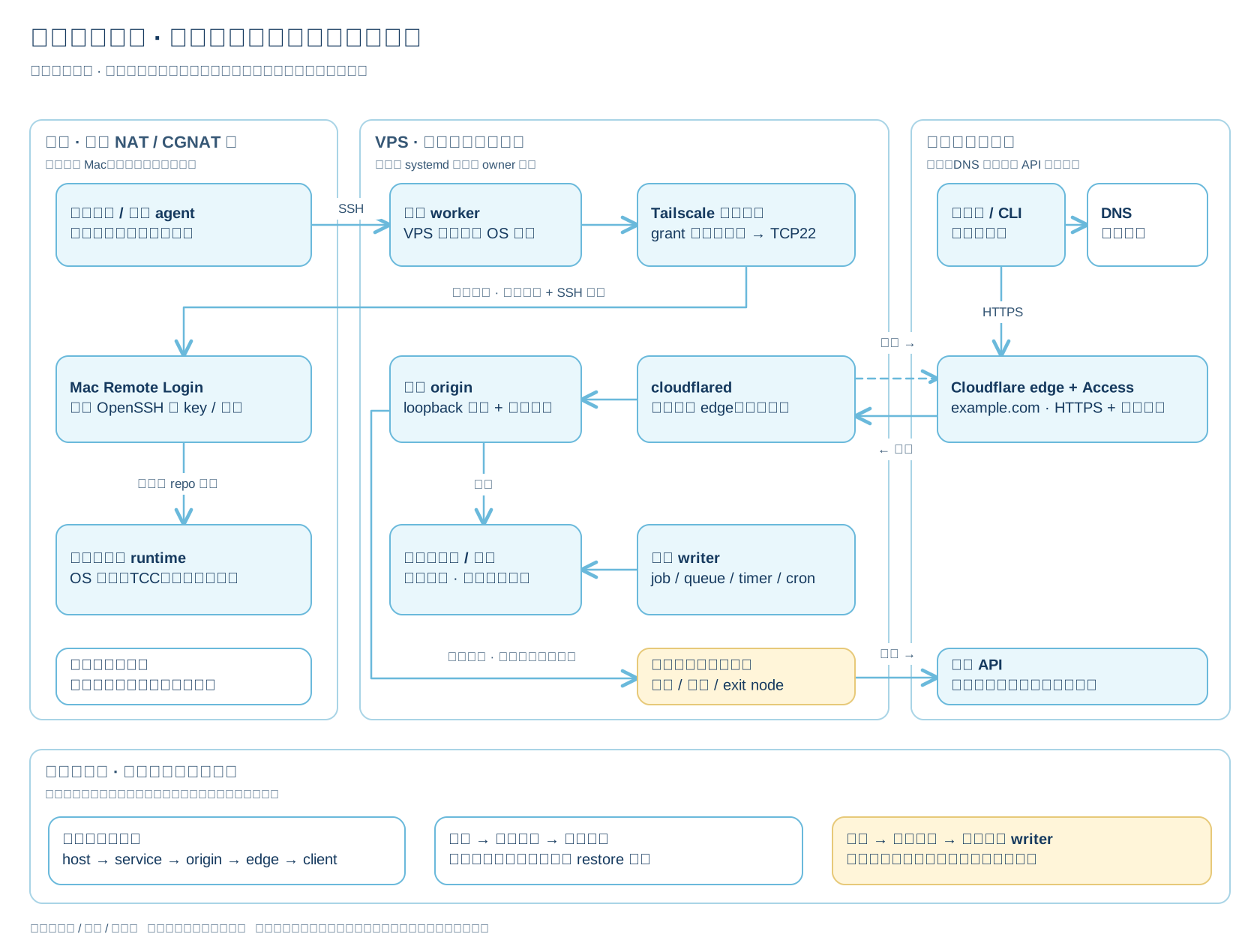
Open the full-size overview SVG. The architecture atlas includes overview, control access, public ingress, outbound access, migration state and repository/health data flow. Editable source and rendered diagrams are included. Deployment nodes are illustrative options; the repository does not provision them. Administration, incoming service traffic and outgoing application traffic have different routing and authentication boundaries.
The author's service choices and referrals
VPS: GreenCloud Budget KVM Sale. After moving from Hetzner to GreenCloud, the author recommends considering this annual plan for small personal services and remote workers. Chapter 01 retains the GreenCloud referral, ordinary product link and dated plan comparison. Choose based on your region, workload and billing commitment; check prices, resources and stock at purchase time.
Residential proxy: Proxy-Cheap Dedicated. The author purchased the Dedicated tier of its static residential product, reports very good IP test results for the address received, and says it is usable for accessing the official Claude website / app. This is the author's experience with that purchase, not a promise about every IP's score or availability. Results can vary by ISP, assigned address and test time. Use the author's Proxy-Cheap referral, or start with the ordinary product page and the terminology and experience notes.
An overseas VPS should use its own egress by default: a static residential proxy is not a standard requirement, and this guide does not recommend routinely chaining the two. Access must still meet the target service's region, account and usage requirements; a proxy does not guarantee eligibility or account safety.
Qualifying purchases through either referral may reward the author with a commission or account credit. No additional discount is promised. Ordinary product links are provided so you can compare and choose independently.
What belongs on a VPS
Small websites, authenticated APIs/MCP services, scheduled tasks, lightweight databases, monitoring, independent backup storage and private network access can fit. Desktop UI, a local Keychain, private desktop data sources and GPU-heavy workloads need their own design. A Tunnel does not automatically provide application authorization.
The guide draws on migration and operational failure modes, then rebuilds them as portable instructions. It contains no private infrastructure repository, host inventory, credentials or inherited Git history. Community procedures retain attribution and distinguish local results from claims about account enforcement. Official references were first checked on 2026-10-02; version-sensitive details need fresh verification.
Maintain and verify
docs/ serves readers; agents/ provides work orders; examples/ holds synthetic input; tools/ implements behavior; tests/ supplies evidence. AGENTS.md governs repository contributions and grants no authority over any server.
python3 -m unittest discover -s tests -v
CI runs checks on Linux and Windows with Python 3.9 and 3.13. Linux jobs also collect and render the CI runner's resources. Tutorial commands receive static shell syntax checks; they are not executed against real infrastructure. See contributing and sources and verification scope. Report versions, failing steps and redacted errors, never secrets or raw operational exports.
Licensing
Original functional code and configuration examples use SUL-1.0. Original prose and diagrams use CC BY-NC-SA 4.0. This is a source-available project. These licenses apply to different materials; see LICENSING.md for the exact scope, attribution and third-party boundaries. Product names do not imply affiliation or endorsement.